
Pretty-Printing Large Bundles Without Blowing Memory
A 50 kb Bundle is trivial to pretty-print in memory. A 500 MB export Bundle is not. The formatter that loads the whole payload as a JavaScript object, walks it, and re-serializes will eat memory equal to several times the payload size, and it will crash on payloads that arrive from real bulk-export workflows. Streaming formatters exist. Knowing when to reach for one saves the machine and the operator. The site's FHIR JSON tidier uses in-memory formatting; it is scoped to Bundles a human might paste in. For the wider FHIR framing, the rest of the FHIR walkthrough series has more.
In-Memory Is Fine Up To A Point
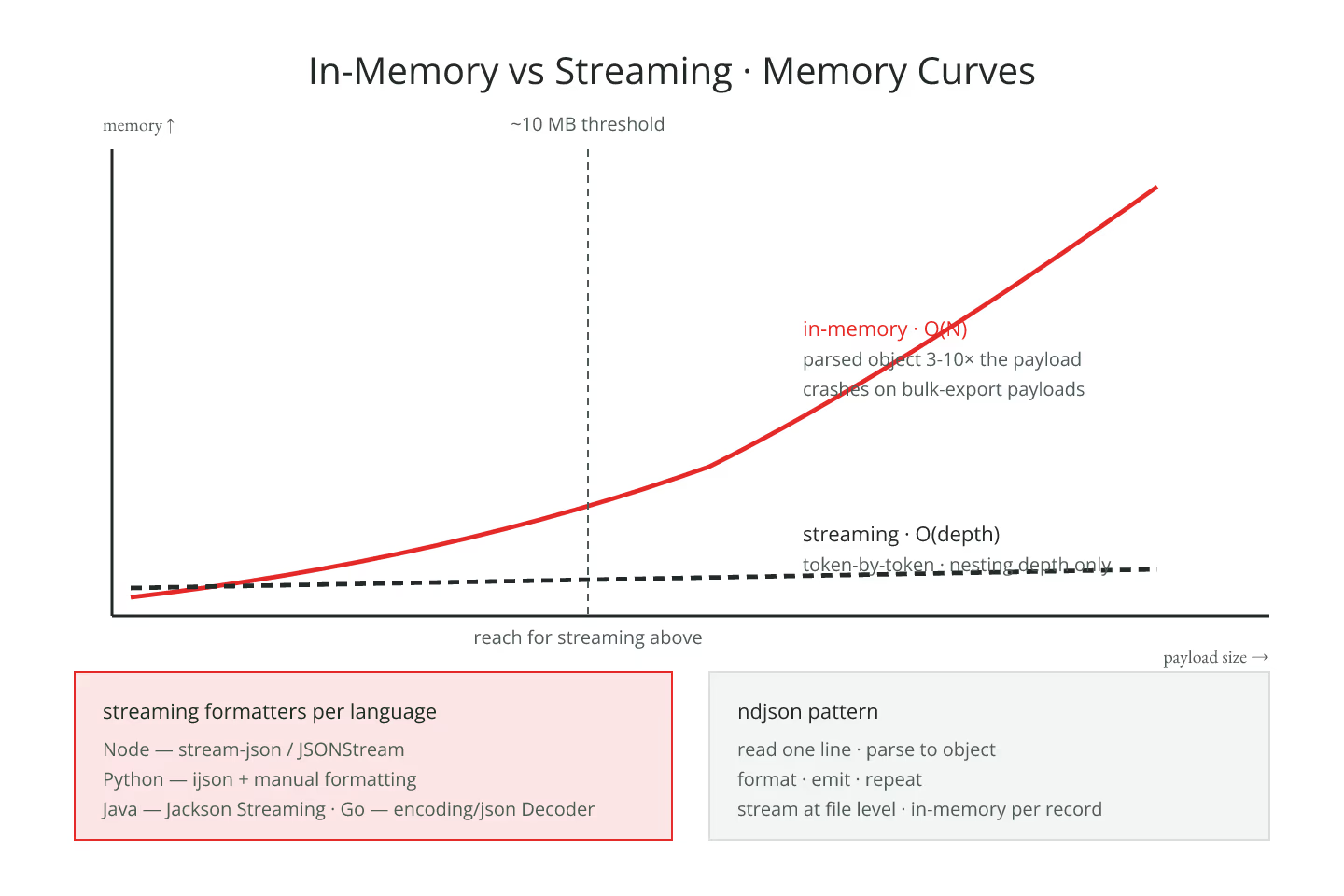
For a Bundle under ~10 MB, in-memory parsing is fast and simple. Load the JSON, walk the parsed structure, re-serialize with indentation. That is the shape of every off-the-shelf formatter.
Above that scale, memory becomes the bottleneck. A parsed JSON object in most languages is 3-10× the serialized byte size.
When To Reach For Streaming
- Bulk-export ndjson files with tens of thousands of resources
- Very large document Bundles (some records reach hundreds of MB)
- Server-side pipelines that format on the fly
- CI validators walking many Bundles in parallel
For each, the in-memory formatter is either slow or crash-prone.
Streaming Formatters
A streaming JSON formatter reads tokens from an input stream, emits formatted tokens to an output stream, and holds only the current nesting depth in memory. Memory usage is O(depth), not O(size).
Every major language has one:
- Node —
stream-json,JSONStream - Python —
ijsonfor parsing plus manual formatting - Java — Jackson's streaming API
- Go —
encoding/json'sDecoder/Encoder
None is as convenient as the in-memory API. All are viable for large payloads.
For the line-length considerations that also matter at scale, line-length choices that survive code review is the entry.
The ndjson Case
Bulk-export ndjson is one resource per line. Each resource is small enough for in-memory formatting. The pattern:
- Read one line
- Parse to object
- Format with indentation
- Emit to output
- Repeat
That is a stream at the file level and in-memory per record. Memory stays bounded regardless of file size.
Handle Binary And Media Specially
Very large Media.data or Binary.data fields — base64-encoded images or documents — are single strings that can dominate the payload. In-memory formatting loads them as one string. Streaming formatters see them as one token; they still hold the whole string in memory briefly.
The safer pattern: store binaries externally, reference them by URL, keep them out of the Bundle entirely. For the reference-preservation implications, keeping references intact after pretty-printing is the entry.
Chunked Processing
For batch pipelines, chunk the Bundle by entry[] and format each chunk independently. That keeps memory bounded and produces readable output progressively.
The trade: the outer Bundle wrapper has to be handled separately. A specialized formatter that knows about Bundle structure can do this; a generic JSON formatter cannot.
Timeouts And Backpressure
A pipeline that formats large Bundles inline should have:
- A timeout per Bundle (fail fast on stuck payloads)
- Backpressure on the input stream (do not read faster than you write)
- Progress logging (silent multi-hour formatters look stuck)
Standard streaming discipline. Applies to any bulk data pipeline.
The Short Version
In-memory works up to ~10 MB. Above that, use a streaming formatter. Handle ndjson line-by-line. Store binaries externally. Chunk Bundles when possible. Add timeouts and backpressure. The tidier is for humans; production pipelines need streaming tooling. For the convention side, formatting conventions your team should pin down is the entry.
Sources
- HL7 canonical Bulk Data Access IG for ndjson context - HL7 canonical Bulk Data Access IG for ndjson context